Trying a new coding agent without rebuilding your rules
New coding agents keep arriving, and many of us want to try them. The model is the interesting part. The chore is everything around it: the commands you had taught your old agent to run without asking, the ones it must never run, the folders it may touch. None of that comes with you. Each agent keeps its own permission rules, in its own file and its own format, and you build them up again one prompt at a time.
This post is about that chore, and how Saeta keeps one set of rules for every agent you connect to it. Saeta's behaviour is described as it stood on 12 November 2026, when we ran the examples below through its rules. Saeta has no public release yet.
The same rule, five ways
Take two rules most developers would want: let the agent run npm run test without asking, and never let it run terraform apply. Here is where each agent keeps them.
- Claude Code keeps rules under
permissionsin.claude/settings.jsonin the project or~/.claude/settings.jsonfor you. The two rules areBash(npm run test)in theallowlist andBash(terraform apply *)indeny. Answering "Yes, and don't ask again" to a command adds a rule for that repository (permissions). - Codex keeps command rules in
.rulesfiles, written in Starlark, for example~/.codex/rules/default.rules. A rule is aprefix_rulewith apatternsuch as["terraform", "apply"]and adecisionofallow,promptorforbidden. These rules decide which commands may run outside Codex's sandbox, and when several match, the most restrictive wins (rules). - Cursor's command-line agent keeps a
permissionsobject in~/.cursor/cli-config.jsonor the project's.cursor/cli.json. A shell entry isShell(commandBase), where the base is the first word of the command:Shell(terraform)indenyblocks everyterraformcommand,planincluded (permissions reference). - Gemini CLI reads TOML policy files from
~/.gemini/policies/. A rule namesrun_shell_command, acommandPrefixsuch asterraform apply, adecisionofallow,denyorask_user, and apriority; the higher priority wins (policy engine). - OpenCode keeps an ordered
permissionslist inopencode.jsonc, with entries such as anactionofshell, aresourceofterraform apply *and aneffectofdeny. The last matching rule wins. Its documentation also warns that the previous version of the format used different names,permissionandbash(permissions).
None of these is wrong. They were designed separately, and it shows. One matches the first word, another a prefix, another a pattern. One lets the most restrictive rule win, another the last, another the highest number. One tool's format has changed under its own users. A rule you got right in one agent can mean something different, or nothing, in the next.
And most rules were never written down on purpose. They piled up, one "don't ask again" at a time, over months of work in one agent. Moving to another means answering all those prompts again, or reading a new format closely enough to write them by hand. It is easy to try a new agent for an afternoon, find it asks about everything, and go back.
One list, kept outside the agent
Saeta sits between an agent and your computer. When a connected agent wants to run a command, edit a file or call an MCP tool, Saeta checks its rules and lets the call through, blocks it, or asks you, in the desktop inbox or on your phone if you paired one.
The rules live in Saeta, on your computer, not in any agent. Each agent's hook describes a call in its own words: Claude Code says Bash, Qwen Code says run_shell_command, Cursor says Shell. Saeta reads each one into the same shape, a command line, a file read or edit, or an MCP tool, before any rule looks at it. So a rule is written once, in one format, and holds for every agent you connect.
Connecting an agent is one command in a terminal, such as saeta install claude-code or saeta install codex, or a button on the desktop app's Agents screen. Saeta backs up the agent's settings before it changes them, and disconnecting takes its changes out again.
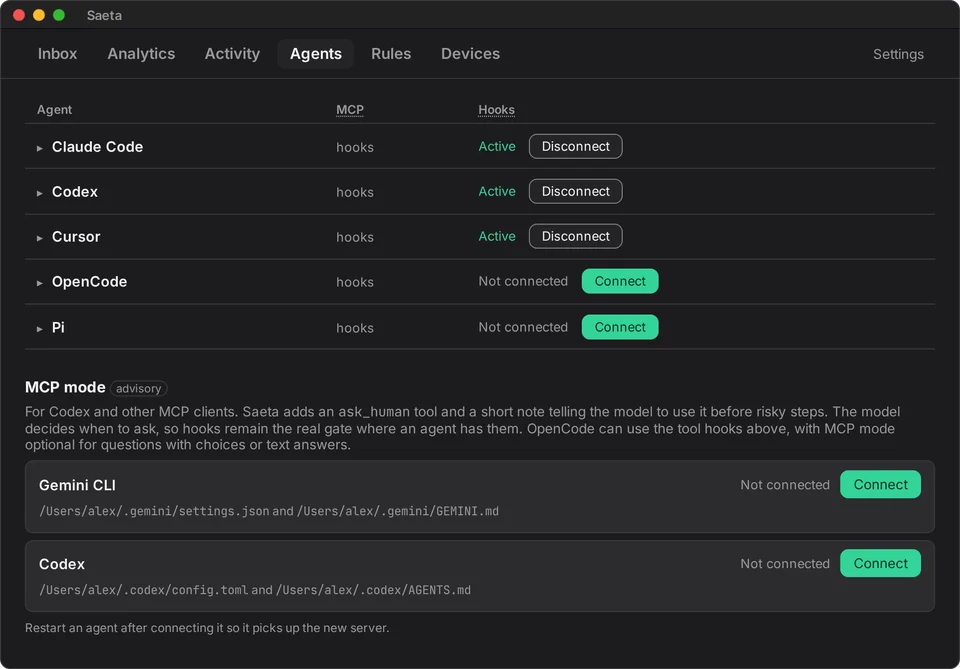
(The screenshots use invented demo data.)
Here is what that means in practice. We remembered two answers while working in Claude Code: "always allow this exact command here" for npm run test in one repository, and "always deny terraform everywhere". Then we sent the same commands through Saeta as each of the other agents with a hook connection would. The results matched for all six:
| Command | Claude Code, Codex, Cursor, Qwen Code, OpenCode, Pi |
|---|---|
npm run test in that repository | runs without asking |
npm run test -- --watch | asks: the remembered answer was for the exact command |
npm run test in another repository | asks: the answer was for that repository |
terraform apply, terraform plan | blocked: the answer was for every terraform command |
git push --force origin main | blocked, by one of Saeta's own rules, with no setup |
The same goes for safe auto mode. Turn it on for a project, and every connected agent working there can build and test without asking, while deleting files or pushing still stops for you, whichever agent tries it. Folders outside the project that you allow for that project or everywhere hold for every agent too, and so do an organisation's rules (in early access) unless it writes one for a single agent.
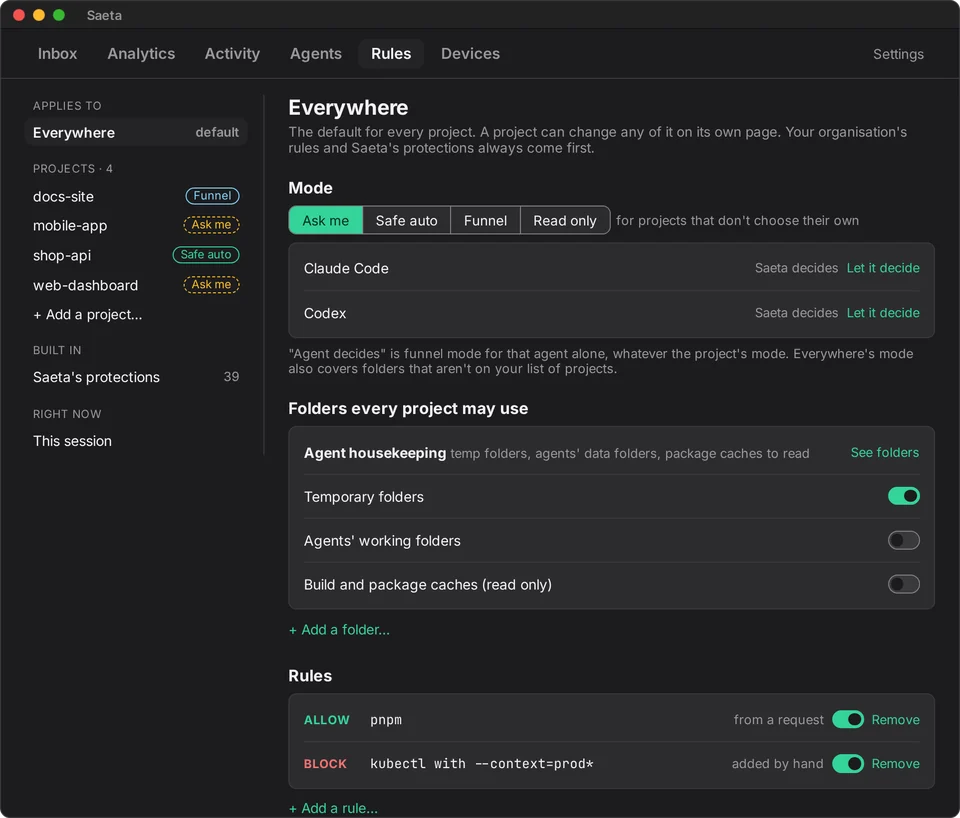
So trying a new agent becomes: install it, connect it to Saeta, and start working. What you taught Saeta while using the old one is already there.
Every agent, but not to the same depth
This is where we have to be careful, because agents don't all let Saeta in the same way. The Connect your agents page lists each one. In short:
- Claude Code, Codex, Cursor, Qwen Code, OpenCode and Pi connect through hooks or a small native extension: the agent waits for Saeta's answer before a tool call runs. The differences are in the details. With Codex, Saeta's "allow" lets the call carry on, and Codex's own approval and sandbox settings still apply after it. With Cursor, a block always holds, but an allow is best effort, because Cursor's own auto-approve is unreliable in some versions. Qwen Code stops waiting for a hook after 60 seconds, so a question nobody has answered in 50 goes back to Qwen Code's own prompt. We have not yet run Qwen Code's hooks against a live Qwen Code, nor Cursor's in the desktop app.
- Gemini CLI, and other agents that speak MCP, connect in what Saeta calls advisory mode. Saeta adds an
ask_humantool and a short note asking the model to use it before risky steps. When the model does, and says what it is about to do, the same rules decide. But the model chooses whether to ask. Gemini CLI's own tools are not held by Saeta, so for now its own policy files still matter. - Rules about MCP tools follow each agent's names for them. Claude Code, Codex and Qwen Code name a tool
mcp__server__tool, Cursor names itMCP:tool, so an answer remembered for an MCP tool in Claude Code does not yet carry over to Cursor. Command and file rules do.
Two more things Saeta does not do. It does not read the rules you already have in each agent, and it does not write its rules into their formats: it decides on each call as it happens, in place of the agent's prompt. Your old settings stay where they were. And for Claude Code and Codex there is a setting, Agent decides, that hands calls back to the agent's own permission system while Saeta keeps its blocks, if you would rather keep a setup you have tuned.
What this is not
Saeta is a guardrail against an agent's mistakes, not a sandbox. It reads the command line, not what a script does once it runs, and an agent set on getting round it can write a script and run that. If you are running code you don't trust, a container or a virtual machine is still the right tool. Each agent's own sandbox, such as Codex's, keeps working underneath Saeta, and that is a good thing.
And whichever agent you use, keep your work in version control. It undoes more mistakes than any rule.
Try it
If you switch between agents, or would like to try the next one without spending an afternoon answering its prompts, join the waitlist. We will email you when early access opens. The agent compatibility guide goes into each agent's limits, and our post Safe auto mode when a dev container doesn't fit looks at safe auto mode on your own computer, where a dev container doesn't fit.
Sources
- Configure permissions, Claude Code documentation.
- Rules, Codex documentation.
- Permissions, Cursor CLI reference.
- Policy engine, Gemini CLI documentation.
- Permissions, OpenCode documentation.
- Connect your agents, safe auto mode and funnel mode, Saeta's documentation.