Setting coding agent rules for a whole company
Once a few people in a team use coding agents, someone asks the obvious question: what are the agents allowed to do here? Maybe nobody should let an agent run terraform apply from a laptop, because infrastructure changes go through CI. Maybe publishing a package should always need a person. And the team's own build tool should just run, so nobody has to answer the same prompt twenty times a day.
Writing those rules down is the easy part. Getting them onto every developer's computer, keeping them there, and still letting each developer tune their own setup is harder. This post is about how Saeta handles that today, and what it doesn't do yet.
Organisation rules in Saeta are in early access, and Saeta has no public release yet. Its behaviour is described as it stood on 12 November 2026, when we ran the example below through its rules.
Updated on 26 November 2026: this post first listed the layered Rules screen and an organisation's limits on the modes developers choose as planned. Both are now built, and the post describes them as they stood on that day.
Every agent has its own lock
The agents themselves are getting better at this. Each now has a way for an administrator to set rules a developer can't override:
- Claude Code reads managed settings from a
managed-settings.jsonfile, an MDM policy or the claude.ai admin console. Nothing in a developer's own files overrides a managed key (settings). - Codex has requirements, "constraints that users can't override", from the admin console, MDM or a system file. Command rules there can only ask or forbid, not allow (managed configuration).
- Gemini CLI has an admin tier of policy files in a system folder, such as
/etc/gemini-cli/policieson Linux, and admin policies always beat a user's (policy engine).
If your company uses one agent, its own controls may be all you need. The trouble starts when developers use two or three, or want to try the next one. Then the same rule has to be written in each agent's format, rolled out through each agent's channel, and kept in step by hand. Our post Trying a new coding agent without rebuilding your rules shows how differently five agents describe even one rule.
One policy, above each developer's rules
Saeta sits between an agent and the computer. When a connected agent wants to run a command, edit a file or call an MCP tool, Saeta checks its rules and lets the call through, blocks it, or asks the developer. Every agent connected to Saeta goes through the same rules, so an organisation writes its rules once.
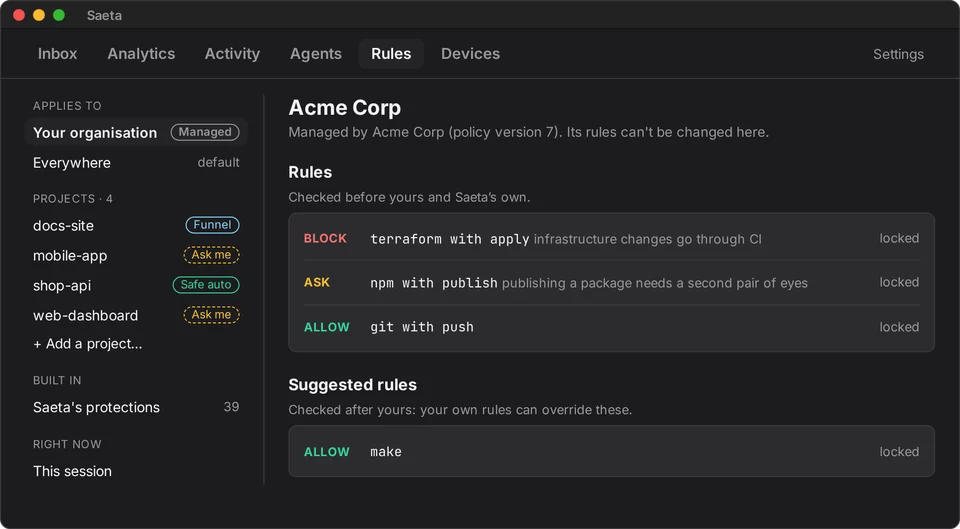
An organisation's rules come as a policy: a signed file in the same format as a developer's own rules, with one extra layer. Here is the example we ran, for an invented company called Acme Corp:
- Block
terraform apply, because infrastructure changes go through CI. - Ask before
npm publish, marked high risk, so a question nobody answers ends in no. - Allow
git push, so pushing a branch doesn't stop for a prompt. - Suggest allowing
make, as a default a developer may change.
The developer had three rules of their own: always allow terraform, never allow make, always allow cargo.
(The screenshot uses invented demo data.)
On the Rules screen, the organisation is a layer of its own, "Your organisation", marked "Managed" and listed above Everywhere and the developer's projects. Its page says "Managed by Acme Corp" and shows the organisation's rules, locked; the developer's own rules stay on their own pages. saeta status in a terminal says the same. Here is what Saeta decided:
| Command | Default | Managed mode |
|---|---|---|
terraform apply | blocked by the organisation | blocked by the organisation |
terraform plan | runs: the developer's own allow | asks: the developer's rules are off |
npm publish | asks, high risk | asks, high risk |
git push origin feature | runs: the organisation's allow | runs: the organisation's allow |
git push --force origin main | blocked by Saeta's own rule | blocked by Saeta's own rule |
make build | blocked: the developer's rule beats the suggestion | runs: the organisation's suggestion |
cargo test | runs: the developer's own allow | asks: the developer's rules are off |
A few things follow from that table.
An organisation's block beats everything. The developer's own "always allow terraform" still lets terraform plan through, but not apply.
An organisation's allow does not beat Saeta's own protections. The policy allows git push, but a force push to main is still blocked by one of Saeta's built-in rules. An organisation can make Saeta stricter than it ships, not looser.
Suggestions are only suggestions. Rules an organisation lists as defaults sit below the developer's, so the developer's "never allow make" wins.
Managed mode is a choice, not the default. With allow_user_rules set to false, a developer's own rules stop counting, and only the organisation's rules and Saeta's own decide. Anything they don't cover goes to the developer as a question.
What developers can and can't change
By default, developers keep their own setup. They add rules, remember answers, turn on safe auto mode for a project and give agents folders outside a project. What they can't do is change the organisation's rules: Saeta refuses to remove, switch off or edit them, from the app, the command line or a paired phone.
A policy can also:
- turn on managed mode, as above. Developers can still switch off or remove their own ignored rules, but not add new ones;
- turn off folder grants, so only the organisation decides which folders outside a project agents may use;
- force one of Saeta's built-in folder groups on or off;
- limit the modes developers may choose, such as allowing Ask me and safe auto mode but not funnel mode. A mode the organisation leaves out is greyed out in the app, and where a developer had chosen it, Saeta uses the mode that would apply without that choice (for a project, the outer project's or Everywhere's), or Ask me when no other mode is set. Ask me is always allowed, and a policy can also set the mode itself, with a safe auto or funnel mode rule of its own;
- decide what happens while Saeta isn't running. By default, agent calls are blocked then, because none of the organisation's rules can apply.
The organisation policies page for administrators has every setting, the order rules are checked in, and the full table of what developers can change.
Getting the policy onto every computer
Today, an administrator installs two files on each computer, in a folder only an administrator can write, such as /etc/saeta/managed/ on Linux: the organisation's public key and the signed policy. Saeta reads them when it starts and on saeta reload. Anything that can put a file on a fleet of computers can deliver them, such as an MDM profile or a configuration management tool.
Saeta checks the signature against the key, and keeps the last policy that verified. A policy that is deleted, broken, or older than the one in force never leaves a computer with fewer rules. To take a computer out of management, an administrator removes the key file.
For now, policies are signed with a development tool that keeps the private key in a plain file: fine for trying organisation rules out, not for a company's production keys.
Audit, today and planned
On each computer, Saeta's Activity screen records every call with the rule that decided it, so a developer can filter by an organisation rule and see what it blocked or asked about. That record stays on the computer. Nothing is sent to the organisation yet.
The rest of the picture is planned, not built, and has no date:
- A Saeta server for the organisation, run on its own infrastructure, with an admin console, single sign-on, and computers that enrol and fetch new policies themselves, instead of files copied by hand.
- Central reporting: which agents are used, how often, and which rules fire, collecting metadata by default and command text only if the organisation chooses to, and telling developers when it does.
- Trying a rule before enforcing it, so an administrator can see what a rule would have blocked before it blocks anything.
What this is not
Saeta is a guardrail against an agent's mistakes, not a sandbox, and an organisation's policy doesn't change that. Saeta reads the command line, not what a script does once it runs. A policy keeps agents within the organisation's rules; it is not a lock against the developer, who can still change Saeta's files on their own computer. And it doesn't replace a container or a virtual machine for code you don't trust.
Try it
If your company would like its agents to follow one set of rules, whichever agent each developer uses, join the waitlist. We will email you when early access opens. Administrators can read organisation policies first, and the agent compatibility guide explains how deeply Saeta reaches into each agent.
Sources
- Settings files and precedence, Claude Code documentation.
- Managed configuration, Codex documentation.
- Policy engine, Gemini CLI documentation.
- Organisation policies, safe auto mode and folders outside a project, Saeta's documentation.