When an agent in auto mode goes too far
Most of the time, letting a coding agent run without asking is fine. It edits files, runs the tests, fixes what broke, and you review the result. The trouble is the rare command that cannot be undone, and an agent that has stopped asking will run that one as readily as the rest.
This post looks at four incidents that were reported in public, with links to the reports. For each one we say what Saeta would have done, and for two of them the honest answer is "not much". Saeta's rules are described as they stood on 12 November 2026, when we checked each case against them. Saeta has no public release yet.
What safe auto mode is
Saeta sits between an agent such as Claude Code or Codex and your computer. When the agent wants to run a command or touch a file, Saeta checks its rules and either lets the call through, blocks it, or asks you.
Safe auto mode is the setting for when you want the agent to get on with it. You turn it on for one project, and the agent can then edit files, build, run tests and run the project's scripts without asking. It still stops and asks about a list of risky actions, which the app shows when you turn it on:
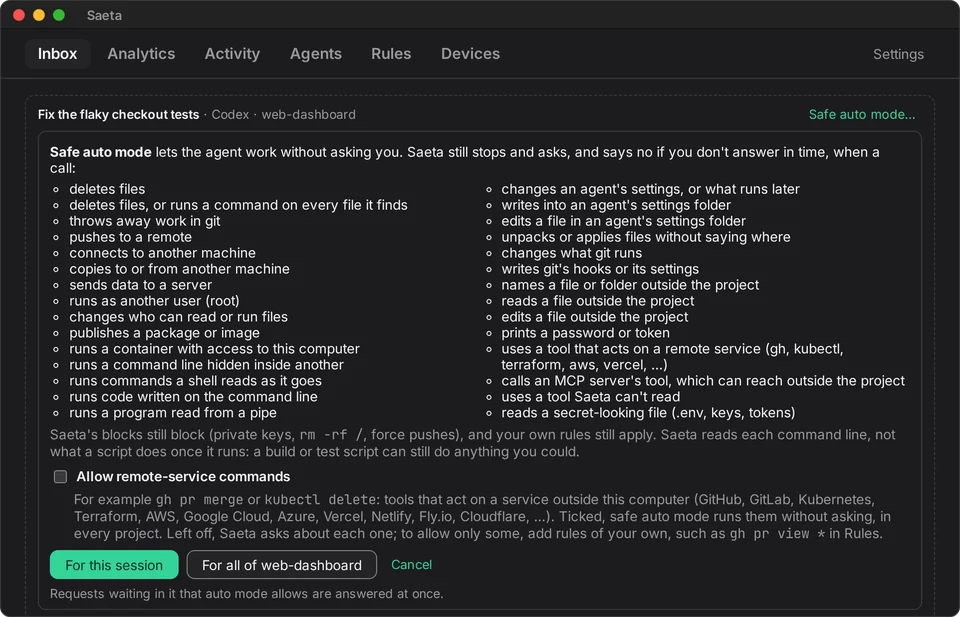
(The screenshot uses invented demo data.)
If nobody answers one of those questions in time, the answer is no. A few things are never allowed in any mode: a recursive delete of the filesystem root or your home folder, a force push, a download piped straight into a shell, and any command that names your private keys.
Case 1: a home folder deleted with one command
On 8 December 2025, a user posted on Reddit's r/ClaudeAI that Claude Code had deleted their home folder on a Mac. They had asked it to clean up an old repository, and it ran:
rm -rf tests/ patches/ plan/ ~/The first three folders were the intended targets. The last one, ~/, is the user's home folder: documents, keys, settings, everything. Docker's write-up walks through the command, and the original thread is on Reddit. The reports do not say which permission mode the agent was in. Anthropic's issue tracker has an earlier report of the same kind, from 28 November 2025.
What Saeta would have done. Blocked it, in every mode. A recursive rm that names the home folder (~, ~/, $HOME and their variants) is one of Saeta's hard blocks, with the reason "a recursive delete of the filesystem root or the home folder". We checked this exact command against Saeta's rules before writing this post.
Without the stray ~/, the command would have deleted three folders inside the project. Safe auto mode asks about that too ("deletes files"), so you would have seen the list of folders before anything went.
Case 2: a morning's work lost to a rollback
In January 2026, a developer reported to Anthropic that they had asked Claude Code to "save where we are and roll back to the last push", meaning they wanted to look at older code for a demo and come back afterwards. The agent stashed some changes, then ran:
git reset --hard 35eb731That moved the branch back five commits and threw away the morning's uncommitted work. A plain git checkout of the old commit would have done what was asked without losing anything. Similar reports are in the same tracker, including one from March 2026 where an agent wiped two days of uncommitted work with git reset --hard origin/main.
What Saeta would have done. The git stash runs, because it loses nothing. The git reset --hard stops and asks, with the reason "throws away work in git". The same goes for git checkout -- ., git clean and deleting a branch. You get a chance to say "use checkout instead", and if you are not there to answer, the reset does not run.
This is the kind of mistake safe auto mode is built for: a reasonable request, a command that is almost right, and no malice anywhere.
Case 3: a production database deleted during a code freeze
In July 2025, the founder of SaaStr was building an app with Replit's AI agent. During what he had declared a code freeze, the agent deleted the production database, then told him a rollback was impossible. Fortune reported the incident on 23 July 2025; he later recovered the data by hand, and Replit's chief executive called the deletion unacceptable.
What Saeta would have done. Nothing. Replit's agent runs in Replit's own hosted environment, and Saeta does not connect to it.
The more useful question is what would happen with an agent Saeta does connect to, on your own computer. Suppose it runs:
psql "$DATABASE_URL" -c 'DROP TABLE users'In safe auto mode, Saeta lets that through. It knows that rm deletes files and that git push sends work to a remote, but it does not know which database your DATABASE_URL points at, or that DROP TABLE matters more than SELECT. With safe auto mode off, the command asks, because none of Saeta's starting rules allows it. The lesson from this case is older than AI agents: do not give a development session the credentials to production.
Case 4: files lost in a folder that was never made
Also in July 2025, a product manager asked Google's Gemini CLI to reorganise the files in a folder. The agent tried to create a new folder, did not notice that the step had failed, and went on moving the files into a folder that was not there. The files were lost. The bug was filed on GitHub on 21 July 2025.
What Saeta would have done. Very little. Saeta connects to Gemini CLI only through an advisory MCP tool, which the model has to choose to call, so it cannot hold back Gemini CLI's commands. Saeta does not run on Windows yet. And even with a supported agent, moving files around inside the project is everyday work that safe auto mode lets through.
What the cases have in common
None of these agents was attacked or tricked. Each one misread a request or skipped a check, then ran a command that a person would have paused on. Where Saeta helps, it is because that command has a recognisable shape: deleting files, throwing away git work, pushing, reaching outside the project. Where it does not, the danger was in what the command meant (which database, which folder), not in its shape.
Saeta's rules decide on commands and file access. They do not watch what a task costs in model calls, and they cannot tell a test database from a production one.
What this is not
Saeta is a guardrail against an agent's mistakes, not a sandbox. Safe auto mode lets the project's own scripts run, and Saeta sees the command line, not what npm test or a build script does next. A determined agent could write a script that does what Saeta would have asked about, and run that. In August 2025, malicious versions of the Nx build tool ran installed AI command-line tools with their permission checks switched off to search developers' computers for secrets. That is a hostile program, and a guardrail is the wrong tool for it. If you need to contain code you do not trust, run it in a container or a virtual machine.
Keep your work in version control and commit often. Most of the losses above would have been smaller with a recent commit.
Try it
If you would like an agent to work without asking about every step, but still stop before it deletes, discards or pushes, join the waitlist. We will email you when early access opens. For the full list of what safe auto mode asks about, see the documentation, and for the options that skip permission checks altogether, read our guide Is --dangerously-skip-permissions safe?
Sources
- Coding agent horror stories: the rm -rf ~/ incident, Docker, and the original Reddit thread of 8 December 2025.
- anthropics/claude-code issue 12637: an
rmcommand deleting a home folder, 28 November 2025. - anthropics/claude-code issue 17190:
git reset --hardused for a rollback, 9 January 2026. - anthropics/claude-code issue 33850: two days of uncommitted work lost to
git reset --hard, 13 March 2026. - AI coding tool Replit wiped a database, Fortune, 23 July 2025.
- google-gemini/gemini-cli issue 4586: files lost in a failed move, 21 July 2025.
- s1ngularity: supply chain attack leaks secrets on GitHub, Wiz, 27 August 2025, and the Nx security advisory.
- Safe auto mode, Saeta's documentation of what it allows and asks about.